Understanding DNS: The Internet's Phone Book
Understanding DNS: The Internet’s Phone Book
Ever wondered what happens when you type google.com into your browser? Behind that simple action lies one of the most elegant distributed systems ever created: the Domain Name System (DNS). Think of it as the internet’s phone book, but instead of looking up phone numbers, it translates human-readable domain names into IP addresses that computers can understand.
What Exactly is DNS?
DNS is essentially a hierarchical, distributed database that maps domain names to IP addresses. When you visit a website, your computer needs to know the exact IP address of the server hosting that site. Since remembering 142.250.80.14 is much harder than remembering google.com, DNS acts as the translator.
But here’s where it gets interesting: DNS isn’t just one big database sitting somewhere. It’s a globally distributed system with multiple layers of caching and redundancy that can handle billions of queries per day.
The DNS Resolution Process: A Step-by-Step Journey
Let’s trace what happens when you type blog.example.com in your browser:
Step 1: Check Local Cache
Your browser first checks its own cache. If it recently looked up this domain, it might already know the answer.
Step 2: Operating System Cache
If the browser cache misses, your OS checks its DNS cache.
Step 3: Router Cache
Still no luck? Your router might have cached the result from a previous query.
Step 4: ISP Recursive Resolver
Now we reach your ISP’s DNS server (called a recursive resolver). This is where the real magic happens.
Step 5: The Recursive Query Dance
If the ISP’s server doesn’t have the answer cached, it starts the recursive resolution process:
- Query Root Server: “Where can I find info about
.comdomains?” - Root Server Response: “Ask the
.comTLD servers at these addresses” - Query TLD Server: “Where can I find info about
example.com?” - TLD Server Response: “Ask example.com’s authoritative servers”
- Query Authoritative Server: “What’s the IP for
blog.example.com?” - Authoritative Response: “It’s
192.168.1.100”
Step 6: Caching and Response
The recursive resolver caches this result (respecting the TTL) and sends it back to your computer, which also caches it and finally connects to the website.
The DNS Hierarchy: From Root to Leaf
DNS follows a hierarchical structure, much like a tree turned upside down:
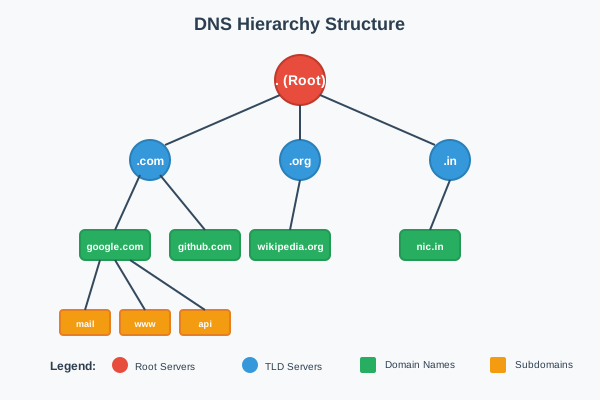
DNS Hierarchical Structure
Root Servers: The Foundation
At the very top are the root servers - 13 logical servers (labeled A through M) distributed worldwide. These servers don’t know where google.com is, but they know who to ask about .com domains.
Real-World Impact and Scale
Root servers are the most critical infrastructure on the internet, handling over 1 trillion queries per day. Each logical root server is actually a cluster of hundreds of physical servers using anycast routing to direct queries to the nearest server. For example:
- Root server ‘F’ operated by Internet Systems Consortium has over 300 physical servers across 80+ locations
- Root server ‘L’ operated by ICANN spans 160+ locations globally
- During major internet events (like DNS attacks or outages), root servers can see query volumes spike to 5-10x normal levels
Critical Failure Scenarios
Real-world incidents show why root servers are so important:
- 2016 DDoS Attack: Root servers experienced a massive attack with peak traffic of 5Tbps, demonstrating the resilience of the distributed architecture
- Hurricane Sandy (2012): Some root server locations went offline, but anycast routing automatically redirected traffic to other locations
- Cable cuts: When undersea cables are damaged, root servers in affected regions seamlessly failover to alternative routes
What Root Servers Contain
Root servers maintain the root zone file, which is the authoritative source for all top-level domains. Here’s what they store:
- NS records for all TLD servers (like .com, .org, .net, country codes)
- Glue records (A/AAAA records) for TLD name servers to prevent circular dependencies
- DS records for DNSSEC chain of trust
- Root zone file managed by IANA
Example of root server content:
|
|
How Root Servers Are Updated
The root zone update process is one of the most carefully controlled operations on the internet:
- IANA manages the root zone file on behalf of the global internet community
- Change requests come from TLD operators (like adding new TLDs or updating name servers)
- Extensive validation includes technical and administrative verification
- Root Zone Maintainer (currently Verisign) implements approved changes
- Distribution to all 13 root server operators worldwide
- Propagation typically occurs within hours
Verification:
|
|
The serial number (2024012700) indicates the date and version of the root zone.
Top-Level Domain (TLD) Servers
The next level consists of TLD servers that handle domains like .com, .org, .net, and country-specific domains like .in or .uk. When a root server receives a query for google.com, it responds with the addresses of .com TLD servers.
Scale and Business Impact
TLD servers operate at massive scale and are big business:
- Verisign (.com/.net): Processes over 190 billion DNS queries daily and manages 174+ million .com domains
- Revenue impact: Verisign generates over $1.3 billion annually just from .com domain management
- Growth trends: .com domains grow by about 3-5 million per year, while new gTLDs like .app, .dev show rapid adoption
Real-World Use Cases and Examples
Enterprise Domain Strategies:
- Google: Owns multiple TLDs (.google, .youtube, .gmail) for brand protection and control
- Amazon: Uses .amazon for internal services and brand consistency across 200+ countries
- Governments: Many countries strictly control their ccTLD policies (e.g., .gov restricted to US government, .edu for educational institutions)
Security and Fraud Prevention:
- ICANN’s Collision Detection: New gTLD launches require extensive testing to prevent conflicts with internal corporate domains
- Domain hijacking: TLD operators implement strict transfer policies after incidents like the 2008 .org hijacking attempt
- Sunrise periods: New gTLD launches include trademark protection phases where brand owners can register their domains first
Who Maintains TLD Servers?
TLD servers are operated by different organizations depending on the domain type:
Generic TLDs (gTLDs):
.comand.net: Operated by Verisign under contract with ICANN.org: Operated by Public Interest Registry (PIR).info: Operated by Afilias- New gTLDs like
.app,.dev: Various operators approved by ICANN
Country Code TLDs (ccTLDs):
.uk: Nominet UK.de: DENIC eG (Germany).jp: Japan Registry Services.in: National Internet Exchange of India
What Records Are Stored in TLD Servers?
TLD servers act as the delegation layer, storing information about which name servers are authoritative for each domain under their TLD. Here’s what they contain:
Primary Records:
- NS records pointing to authoritative name servers for each domain
- Glue records (A/AAAA) for name servers when needed
- DS records for DNSSEC chain of trust
- Domain registration metadata (registrar info, creation dates, etc.)
|
|
What TLD servers DON’T contain:
- Individual A records for websites (like www.google.com)
- MX records for email
- TXT records for verification
- Any application-specific DNS records
Real-world verification:
|
|
Authoritative Name Servers
Finally, we have authoritative name servers that actually know the IP addresses for specific domains. Google’s authoritative servers know that google.com points to their IP addresses.
Enterprise DNS Infrastructure Examples
Content Delivery Networks (CDNs):
- Cloudflare: Operates over 330 data centers globally, with authoritative DNS servers answering queries in under 10ms from 95% of the world’s population
- AWS Route 53: Handles trillions of queries monthly with 100% uptime SLA, using anycast to route queries to the nearest edge location
- Google Cloud DNS: Processes over 1 trillion queries daily across their global network, supporting instant global propagation
Real-World Business Use Cases
Geographic Load Balancing:
|
|
Blue-Green Deployments:
- GitHub: Uses DNS switching for zero-downtime deployments, changing TTL to 60 seconds before major updates
- Stripe: Implements canary deployments by gradually shifting DNS weights between old and new infrastructure
- Shopify: Uses DNS failover to automatically redirect traffic during maintenance windows
Multi-Cloud Strategies:
- Spotify: Runs authoritative DNS across AWS, Google Cloud, and their own infrastructure for redundancy
- Dropbox: Uses DNS to seamlessly migrate services between cloud providers without user impact
- Zoom: Leverages geo-distributed authoritative servers to handle massive traffic spikes (2020 pandemic scaling)
High Availability Patterns
Disaster Recovery:
- Financial services: Banks like JPMorgan maintain authoritative DNS servers in at least 3 geographic regions with automatic failover
- E-commerce: During Black Friday, Amazon pre-scales their authoritative DNS infrastructure to handle 10x normal query volumes
- Social media: Facebook’s authoritative servers use health checking to automatically remove failed backend servers from DNS responses
Performance Optimization:
- Gaming companies: Epic Games uses ultra-low TTL values (30 seconds) during Fortnite events to rapidly adjust server capacity
- Streaming services: Disney+ dynamically adjusts DNS responses based on real-time CDN performance metrics
- SaaS platforms: Salesforce uses DNS-based traffic shaping to distribute load across multiple data centers based on capacity
DNS Record Types: More Than Just IP Addresses
DNS isn’t just about translating domain names to IP addresses. Different record types serve different purposes:
A Records
Maps a domain name to an IPv4 address.
Real-world example:
|
|
This shows that google.com resolves to the IP address 142.250.193.142 with a TTL of 180 seconds.
Advanced A Record Use Cases
Load Balancing with Multiple A Records:
|
|
Netflix uses multiple A records for round-robin load balancing, distributing traffic across multiple servers.
Geo-DNS Implementation:
- AWS Route 53: Returns different A records based on user location (US users get Virginia IPs, EU users get Dublin IPs)
- Cloudflare: Uses anycast - same IP globally, but traffic routes to nearest data center
- CDN Integration: Akamai returns A records pointing to edge servers closest to the user
TTL Strategies:
- High-traffic sites: Google uses short TTLs (180s) for rapid failover during outages
- Static content: Personal websites often use longer TTLs (3600s) to reduce DNS queries
- During migrations: Companies temporarily lower TTL to 60 seconds before switching infrastructure
AAAA Records
Maps a domain name to an IPv6 address.
Real-world example:
|
|
IPv6 Adoption and Business Impact
Major Platform IPv6 Support:
- Google: Over 40% of Google traffic now comes via IPv6, with AAAA records serving billions of users
- Facebook: Implemented IPv6-only data centers, using AAAA records exclusively for internal services
- Cloudflare: Automatically provides dual-stack (both A and AAAA) records for all customers
ISP and Regional Differences:
|
|
Performance Benefits:
- Reduced latency: Direct IPv6 routing often faster than IPv4 + NAT
- Mobile optimization: Cellular networks prefer IPv6 for battery life and performance
- CDN efficiency: Content delivery networks use IPv6 for better global routing
Enterprise Migration Strategies:
- Dual-stack deployment: Most companies run both A and AAAA records during transition
- IPv6-only applications: New microservices increasingly deploy with AAAA records only
- Security considerations: IPv6 firewalls require different rules than IPv4
CNAME Records
Creates an alias from one domain name to another. Many CDNs and load balancers use CNAME records to point traffic to their infrastructure.
Real-world example:
|
|
CDN and Load Balancer Integration
Content Delivery Networks:
|
|
Real Enterprise Examples:
- Netflix: Uses CNAME records to point
www.netflix.comto their CDN infrastructure across 200+ countries - Shopify stores: Each store gets a CNAME like
store.myshop.com→shops.myshopify.com - GitHub Pages: Custom domains use CNAME to point to
username.github.io
Advanced CNAME Patterns
Multi-level CNAME chains:
|
|
Traffic Management:
- Blue-green deployments: Switch CNAME from
app-blue.company.comtoapp-green.company.com - A/B testing: Route percentage of traffic using weighted CNAME records
- Maintenance mode: Temporarily point CNAME to maintenance page
Common Limitations and Gotchas:
- Apex domain restriction: Cannot use CNAME for root domain (company.com)
- Email conflicts: CNAME at root breaks MX records
- Performance overhead: Each CNAME adds additional DNS lookup
- Chain limits: Most resolvers limit CNAME chains to 10 hops
Modern Alternatives:
- ALIAS records: CloudFlare and AWS Route 53 allow CNAME-like behavior at apex
- ANAME records: Some providers offer flattened CNAME functionality
MX Records
Specifies mail servers for email delivery.
Real-world example:
|
|
This shows that GitHub uses Google’s mail servers for email delivery, with different priority levels (lower numbers = higher priority).
Enterprise Email Infrastructure
Google Workspace (formerly G Suite):
|
|
Microsoft 365:
|
|
Priority-Based Failover Strategy:
- Priority 1: Primary mail server (handles 90%+ of mail)
- Priority 5: Secondary servers (backup for primary)
- Priority 10: Tertiary servers (final fallback)
Advanced MX Configurations
Load Balancing with Equal Priority:
|
|
Hybrid Cloud Email:
|
|
Email Security Integration:
- Proofpoint: Many enterprises add
pphosted.comMX records for email filtering - Mimecast: Uses MX records pointing to
*.mimecast.comfor security scanning - Spam filtering: Third-party services act as MX record intermediary before internal mail servers
Business Impact and Reliability
Email Delivery Guarantees:
- SLA requirements: Fortune 500 companies often require 99.9% email uptime
- Geographic distribution: Global companies use MX records across multiple continents
- Disaster Recovery: Separate MX priorities for different data centers
Cost Considerations:
- Google Workspace: $6-18/user/month, managed via MX records
- Microsoft 365: $5-22/user/month, simplified MX configuration
- Self-hosted: Requires multiple servers, backup infrastructure reflected in MX records
Compliance and Governance:
- Financial services: MX records must point to compliant email infrastructure
- Healthcare: HIPAA-compliant email routing via specific MX configurations
- Government: Many agencies require on-premises MX records for security
TXT Records
Stores arbitrary text data, often used for verification and security.
Real-world example:
|
|
Facebook uses TXT records for SPF email authentication, Google site verification, and Zoom domain verification.
Email Security and Authentication
SPF (Sender Policy Framework):
|
|
SPF records prevent email spoofing by defining which servers can send email from a domain.
DKIM (DomainKeys Identified Mail):
|
|
DKIM uses cryptographic signatures stored in TXT records to verify email authenticity.
DMARC (Domain-based Message Authentication):
|
|
DMARC policies define how to handle emails that fail SPF/DKIM checks.
Domain Verification and Ownership
SSL Certificate Validation:
|
|
Cloud Provider Verification:
|
|
Modern Applications and API Keys
Blockchain and Cryptocurrency:
|
|
API Configuration:
|
|
Business and Compliance Use Cases
Brand Protection:
- Trademark verification: Companies use TXT records to prove domain ownership in disputes
- Social media verification: Twitter, LinkedIn verify domain ownership via TXT records
- Corporate policies: Internal TXT records for security scanning tools
Regulatory Compliance:
|
|
Security and Monitoring:
- CAA records: Stored as TXT to specify which Certificate Authorities can issue certificates
- Security.txt: Vulnerability disclosure information
- Monitoring services: Uptime monitoring services use TXT records for configuration
Enterprise Implementation Patterns
Multi-vendor Integration:
|
|
Security Best Practices:
- Short TTL for verification: Temporary TXT records use 300-second TTL for quick removal
- Subdomain isolation: Verification TXT records often placed on specific subdomains
- Record rotation: Security-conscious organizations rotate DKIM keys and update TXT records quarterly
NS Records
Specifies the authoritative name servers for a domain.
Real-world example:
|
|
Amazon operates its own DNS infrastructure with multiple name servers across different TLDs for redundancy.
What NS Records Actually Contain
NS records contain only the hostname of authoritative name servers - they don’t contain IP addresses directly. Let’s examine what this means with a real example:
Google’s NS Records:
|
|
What each NS record contains:
- Domain name:
google.com.(the domain being delegated) - TTL:
21600(6 hours - how long to cache this record) - Class:
IN(Internet class) - Type:
NS(Name Server record type) - Name server hostname:
ns1.google.com.(the authoritative server name)
To get the actual IP addresses, you need separate A/AAAA queries:
|
|
Why NS Records Work This Way
Flexibility and Independence:
- NS records can point to name servers in different domains or different organizations
- Example: A company can use Cloudflare’s name servers:
ns1.cloudflare.com,ns2.cloudflare.com - The IP addresses of name servers can change without updating NS records
Real-world delegation example:
|
|
Enterprise NS Record Strategy
Multi-provider setup for redundancy:
|
|
This setup allows the company to:
- Maintain control with internal name servers
- Have automatic failover to Cloudflare if internal DNS fails
- Use different providers for different types of queries
Subdomain Delegation Patterns
Departmental DNS Management:
|
|
High Availability and Performance
Anycast DNS Implementation:
- Cloudflare: Uses same NS record IPs globally, but routes to nearest data center
- AWS Route 53: Automatically provides anycast NS records for global performance
- Google Cloud DNS: Distributes queries across 200+ global locations using identical NS records
Load Distribution Strategies:
|
|
Business Continuity Examples
DDoS Protection:
- GitHub (2018): During massive DDoS attack, NS records automatically routed traffic to Akamai for mitigation
- Krebs on Security: Uses multiple NS providers to ensure site availability during targeted attacks
Regulatory Compliance:
|
|
Domain Hijacking Prevention:
- Registry Lock: Critical domains use NS record locks at registrar level
- DNSSEC: NS records protected with cryptographic signatures
- Multi-factor Authentication: NS record changes require multiple approvals
Cost and Vendor Management
DNS Provider Comparison:
- Cloudflare: Free tier includes NS records, enterprise plans for advanced features
- AWS Route 53: $0.50 per hosted zone, pay-per-query pricing model
- Google Cloud DNS: $0.20 per zone, bulk discounts for large enterprises
Vendor Lock-in Mitigation:
|
|
This strategy allows rapid switching between DNS providers without changing infrastructure or applications.
Caching: The Secret to DNS Performance
One of DNS’s most brilliant features is its aggressive caching strategy. Every DNS record comes with a TTL (Time To Live) value that tells resolvers how long they can cache the result.
|
|
This record can be cached for 300 seconds (5 minutes). Caching happens at multiple levels:
- Browser cache: Usually 1 minute
- OS cache: Varies by system
- Router cache: Several minutes to hours
- ISP cache: Hours to days
This layered caching means that popular websites can be resolved almost instantly, while the authoritative servers aren’t overwhelmed with repeat queries.
DNS in Cloud and Microservices
In modern cloud architectures, DNS plays an even more critical role:
Service Discovery
In Kubernetes, services are automatically assigned DNS names like my-service.default.svc.cluster.local, enabling seamless service-to-service communication.
Load Balancing
Cloud providers use DNS to distribute traffic across multiple servers or regions. A single domain might resolve to different IP addresses based on the client’s location.
Blue-Green Deployments
DNS can be used to switch traffic between different versions of an application by simply updating DNS records.
Common DNS Issues and Troubleshooting
Propagation Delays
When you update DNS records, changes don’t appear instantly worldwide due to caching. This is called DNS propagation and can take up to 48 hours (though usually much less).
TTL Considerations
Setting TTL too high means changes take longer to propagate. Setting it too low increases load on authoritative servers.
Split-Brain DNS
Sometimes internal and external DNS servers return different results for the same domain, leading to connectivity issues.
Useful Commands for DNS Troubleshooting
Here are practical examples using real websites:
|
|
Pro tip: If you’re troubleshooting DNS issues, always check multiple DNS servers to see if you get consistent results. Inconsistencies often indicate propagation delays or configuration problems.
The Future of DNS
DNS continues to evolve with new challenges and requirements:
Edge DNS
CDN providers are moving DNS resolution closer to users for even faster response times.
Performance Optimization
New algorithms and caching strategies continue to improve DNS response times globally.
Cloud Integration
Deeper integration with cloud services and container orchestration platforms.
Final Thoughts
DNS is one of those technologies that works so well we rarely think about it. But understanding how it works helps you troubleshoot connectivity issues, optimize application performance, and appreciate the engineering marvel that makes the modern internet possible.
The next time you type a URL into your browser, remember the incredible dance of distributed systems working together to translate that human-readable name into the numbers that computers understand. It’s a testament to the power of simple, well-designed protocols that can scale to serve the entire planet.
Common DNS Misconceptions That Trip Up Engineers
Even experienced engineers often harbor misconceptions about how DNS actually works. Let’s debunk some of the most common ones:
Misconception 1: “DNS Changes Are Instant”
Reality: DNS propagation can take time due to caching at multiple levels. When you update a DNS record, it doesn’t magically appear everywhere instantly.
|
|
Why this matters: Engineers often update DNS records and immediately test, then panic when they don’t see changes. Always account for TTL and propagation delays in deployment planning.
Misconception 2: “Lower TTL Always Means Faster Updates”
Reality: While lower TTL reduces propagation time, it also increases load on your authoritative DNS servers and can hurt performance.
|
|
Why this matters: Setting TTL to 1 second means every client will query your DNS servers every second, potentially overwhelming them during traffic spikes.
Misconception 3: “All DNS Servers Return the Same Results”
Reality: Different DNS servers can return different results due to caching, configuration differences, or geographic policies.
|
|
Why this matters: This is often intentional (CDNs serving geographically closer servers), but can confuse debugging efforts.
Misconception 4: “CNAME Records Can Point to Anything”
Reality: CNAME records have strict limitations and can cause subtle issues.
|
|
Why this matters: CNAME conflicts can cause intermittent resolution failures that are hard to debug.
Misconception 5: “DNS Queries Always Go to the Same Server”
Reality: DNS queries can be load-balanced across multiple servers, and recursive resolvers might query different authoritative servers.
|
|
Why this matters: If one of your DNS servers has stale data or is misconfigured, some users will see different results than others.
Misconception 6: “Internal DNS and External DNS Should Be Identical”
Reality: Split-horizon DNS (different internal vs external records) is common and often necessary.
|
|
Why this matters: Engineers often expect to see the same DNS results from inside and outside the corporate network, leading to confusion during troubleshooting.
Misconception 7: “Flushing DNS Cache Fixes Everything”
Reality: There are multiple cache layers, and flushing your local cache might not help if the issue is upstream.
|
|
Why this matters: Engineers often waste time repeatedly flushing local DNS when the problem is cached data at the ISP or CDN level.
Misconception 8: “DNS Is Just for Web Traffic”
Reality: DNS is used for much more than translating domain names to IPs.
|
|
Why this matters: DNS issues can break email, certificate renewals, service discovery, and other critical infrastructure beyond just web browsing.
Misconception 9: “Public DNS Servers Are Always Better”
Reality: While public DNS servers (8.8.8.8, 1.1.1.1) are often faster and more reliable, they can interfere with geo-based content delivery and internal network resolution.
|
|
Why this matters: Blindly switching to public DNS can break internal applications and bypass optimizations your organization has in place.
DNS might seem like magic, but it’s really just excellent engineering applied to a fundamental problem: making the internet usable for humans.